EasyImport Soil Profiles
Boring logs read automatically or traced by hand into the project borings
geotechwareData · Site dataBeta
Reads FDOT Report of Core Borings, gINT and scanned boring logs into the project borings, and traces plotted SPT N values and CPT soundings by hand where a log cannot be read. Every boring is checked against the sheet, with strata, SPT blow counts, laboratory values and the header, before it is saved.
UsesBoring log PDFs, scans and plotted logs
ProvidesProject borings with strata and SPT values
- Open the logA boring log as a PDF or an image. FDOT sheets exported from CADD and layouts EasyImport has learned are read from the PDF text; scans and other layouts are read from the picture. Logs that cannot be read, and plotted SPT N values and CPT soundings, are traced by hand.
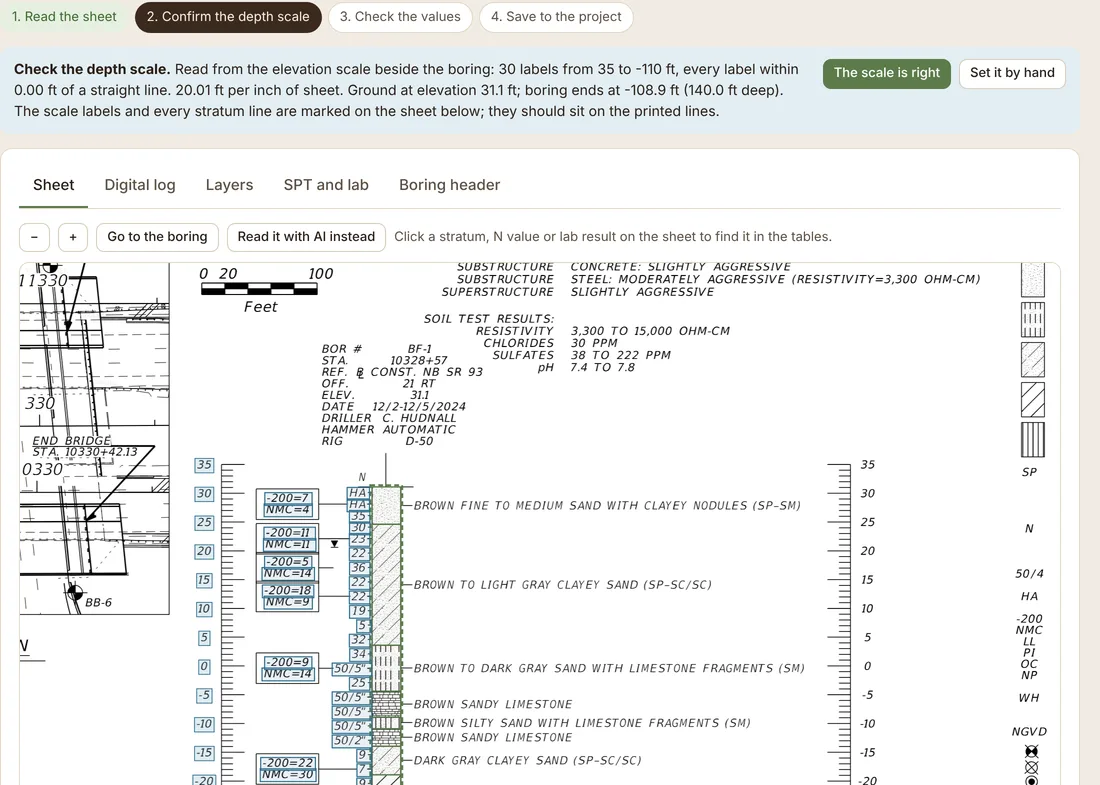
- Confirm the depth scaleThe depth scale is tied to the elevation labels on the sheet, with the ground and termination elevations shown for checking.
- Check the valuesStrata, USCS symbols, SPT N values, laboratory results and the boring header are listed beside the sheet. Each value links to where it was read.
- Save to the projectThe boring is saved to the project borings, where Geotechware design and the load test modules read it.